How to turn your photo into a GTA 6 avatar with AI
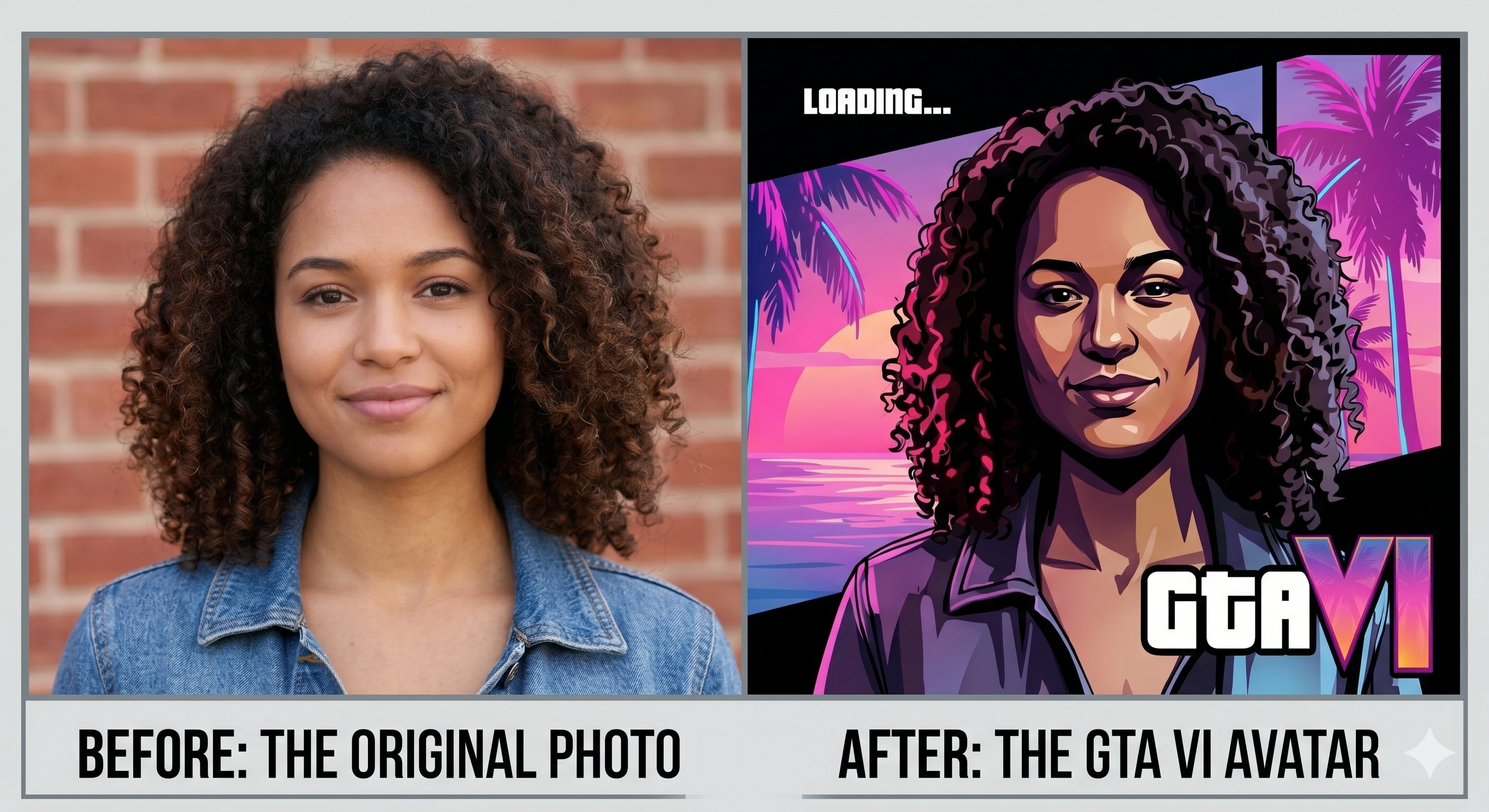
Turning a selfie into a Grand Theft Auto VI loading-screen portrait takes about five minutes and one good prompt. The trick is using an AI model that edits your actual photo rather than inventing a new face, then steering it toward the GTA art style — that signature mix of saturated neon light, hand-painted illustration, and a confident, cinematic pose.
This guide gives you a copy-paste prompt, the exact step-by-step process, and the small adjustments that keep the result looking like you instead of a generic character.
The quick version
Time
~5 min
Start to saved image
You need
1 photo
Sharp, front-facing selfie
Best tool
Gemini
or ChatGPT image edit
- Pick a sharp, well-lit, front-facing selfie.
- Open an AI model that edits uploaded images (Gemini, ChatGPT, or Midjourney).
- Upload your photo and paste the prompt below.
- Generate, then refine with one or two follow-up tweaks.
- Upscale and download.
The prompt
Copy this and paste it into your AI model after uploading your selfie. It's written to preserve your real face while applying the GTA art direction.
Copy-paste prompt
Restyle the person in this photo as a character in the Grand Theft Auto VI art style. Keep the same face, facial features, hairstyle, skin tone, and expression so they stay clearly recognizable — do not change their identity.
Apply a hand-painted, semi-realistic illustration look with bold clean linework and rich cel-style shading. Place them in a sun-drenched neon Vice City setting: palm trees, pastel art-deco buildings, a teal-and-magenta sunset sky, and warm cinematic rim lighting. Confident relaxed pose, slight low camera angle, shallow depth of field. Vibrant saturated colors, film grain, poster-quality composition.
Vertical portrait orientation, head-and-shoulders to waist-up framing.
A few words you can swap to make it yours: change the setting (a downtown street at night, leaning on a sports car, on a beach boardwalk), the mood (menacing, glamorous, laid-back), or wardrobe (leather jacket, tropical shirt, tracksuit). The two lines that matter most — "keep the same face…recognizable" and "Grand Theft Auto VI art style" — should stay.
Step-by-step guide
1. Choose the right source photo
The output is only as good as the input. Your photo should be:
- Front-facing — looking roughly at the camera, both eyes visible.
- Sharp and well-lit — natural daylight is ideal; avoid heavy shadows across the face.
- Unfiltered — skip beauty filters and heavy makeup edits; they confuse the model about your real features.
- Close enough — head-and-shoulders fills most of the frame.
A blurry, dark, or extreme-angle photo is the number-one reason avatars come out looking like a stranger.
2. Pick your AI tool
- Google Gemini — best for likeness
- Its image editing (the "Nano Banana" model) is built to edit a photo you upload, so it keeps your face well. Free tier available. Great first choice.
- ChatGPT — best for easy refining
- Upload your selfie, paste the prompt, then refine in plain English ("make the sky more pink", "add sunglasses"). Free tier covers a few images per day.
- Midjourney — best art quality
- The most polished, poster-like results. Paid only, and exact likeness is harder — use your photo as an image reference (image prompt) and lower the stylize value.
3. Upload your photo and run the prompt
Attach your selfie, paste the prompt from above, and generate. Always include the photo — if you only paste text, the model invents a face that isn't yours.
In Midjourney, add your image as an image prompt at the start of the line and append --stylize 100 --ar 3:4 so it leans on your reference and outputs a vertical portrait.
4. Refine with follow-ups
The first result is rarely perfect. Instead of starting over, give one small instruction at a time:
- "Keep everything the same but make the face match the photo more closely."
- "Same image, change the background to a nighttime neon street."
- "Add a subtle GTA-style poster border and slightly stronger film grain."
Two or three rounds usually nails it. If the face drifts away from you, that's your cue to go back to step 1 with a better source photo.
5. Upscale and save
Once you're happy, use the tool's upscale or "high resolution" option so the image is crisp enough for a profile picture or print. Download it, and you're done.
Tips for a stronger result
- Describe lighting, not just objects. "Warm rim lighting" and "teal-and-magenta sunset" do more for the GTA look than listing props.
- One subject only. Group photos confuse the model — crop to just you first.
- Don't over-prompt the face. Telling it to "keep the same face" beats describing your features in detail, which nudges it toward an average face.
- Match the aspect ratio to where it'll live. 3:4 or 4:5 vertical for a profile picture; 16:9 for a banner.
- Avoid real logos. Don't ask for the GTA logo or a real licensed look — it's a trademark, and you don't need it for the style.
Frequently asked questions
Which AI is best for making a GTA 6 avatar?
For keeping your real face recognizable, an image-editing model that accepts your photo as input is best — Google's Gemini ("Nano Banana") image editing and ChatGPT's image generator both let you upload a selfie and restyle it. Midjourney produces the most polished art but is harder to keep an exact likeness with.
Is making a GTA-style avatar legal?
Creating a stylized picture of yourself for personal use, a profile photo, or fun is generally fine. The GTA logo, official artwork, and character likenesses are trademarked by Rockstar and Take-Two, so don't sell your avatar, imply it's official, or use Rockstar's actual assets.
Why doesn't my avatar look like me?
Three usual causes — a low-quality or heavily filtered source photo, a prompt that over-describes a generic character instead of asking to preserve your features, or a model regenerating from scratch instead of editing your image. Use a sharp, front-facing, well-lit selfie and tell the model to "keep the same face and features."
Can I do this for free?
Yes. Google Gemini and ChatGPT both offer free image tiers that can restyle a photo, though free plans add limits and sometimes watermarks. Midjourney is paid only.
While you're here, get ready for launch — browse the GTA 6 cheats hub, watch the countdown, or check the predicted PC system requirements.
Unofficial fan-made resource. Not affiliated with, endorsed, or sponsored by Rockstar Games or Take-Two Interactive. GTA and Grand Theft Auto are trademarks of their respective owners.